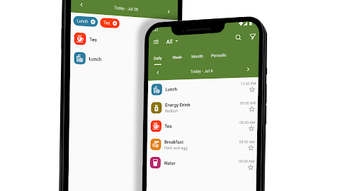

Download Food Diary - Food Tracker – Food Diary, Food Tracker, Healthy Lifestyle, Daily Food Logging, Nutrition Tracking, Diet Management
Overview
Food Diary - Food Tracker is a free Android application designed to support individuals in monitoring their daily food intake and promoting a healthier lifestyle. Developed by iBuild Lab, the app falls under the Lifestyle category with a focus on Food & Drink management. It serves as a personal nutrition tool for users who aim to maintain dietary discipline, manage calorie consumption, or track specific nutritional goals. The primary purpose of the software is to simplify the process of logging meals and snacks, enabling users to build awareness around their eating habits. This can be especially beneficial for individuals managing weight, following dietary restrictions, or working with healthcare professionals to improve nutrition. The app’s interface is built for ease of navigation, allowing users to quickly add, review, and organize their food entries. Real-world usage includes daily meal logging, tracking hydration, setting reminders for meals, and generating reports for professional consultations. The developer did not provide additional details about the company’s background or technical infrastructure.
Key Features & Capabilities
- Custom Food Categories: Users can define and personalize food groups to match their dietary preferences or tracking needs, improving accuracy and relevance.
- Entry Filtering: Entries can be filtered by date or category, allowing for quick access to past logs and trend analysis.
- Daily Reminders: The app sends customizable alerts to prompt users to log their meals, helping maintain consistency and long-term engagement.
- Integrated Calendar: A built-in calendar enables users to visually track which days they have logged food, supporting accountability and routine monitoring.
- Data Export Options: Users can export their food logs in CSV or PDF format, facilitating sharing with nutritionists, trainers, or medical professionals.
- Daily Activity Statistics: The app provides insights into how frequently users perform logging activities, offering a basic overview of tracking behavior.
These features collectively support users in maintaining a structured approach to diet management. For example, a person following a low-carb diet can create a dedicated category for permitted foods and use the calendar to verify daily compliance. The export function allows users to share their logs with a healthcare provider during a consultation, ensuring transparent and data-driven discussions. The ability to filter entries by date helps identify patterns over time, such as increased snacking during weekends. While specific performance metrics were not provided, the design suggests a focus on usability and functionality over advanced analytics.
User Interface, Workflow & Performance
The user interface of Food Diary - Food Tracker is designed with simplicity and accessibility in mind. Navigation is intuitive, allowing users to move between logging, viewing, and managing entries with minimal effort. The layout prioritizes clarity, with clearly labeled sections for food input, date selection, and category assignment. The workflow for logging a meal is streamlined, requiring only a few taps to record a food item and assign it to a category. The app’s performance appears to be optimized for mobile use, though exact resource usage details were not specified. Stability is implied through the consistent availability of core features, including reminders and export functions. The developer did not provide information on CPU or RAM consumption, nor did they specify any known issues or crashes. Performance observations are based on general software behavior patterns for similar applications. Overall, the interface supports efficient daily use, making it suitable for users who value straightforward tools without complex setup.
Compatibility & System Requirements
Food Diary - Food Tracker is available for Android devices. The app is designed to run on mobile operating systems supporting the Android platform. The developer did not specify exact system requirements, including minimum Android version, device architecture, or hardware specifications. Installation size was not disclosed, so users should expect variable storage usage depending on data volume and app updates. Compatibility information was partially provided, with the primary platform being Android. The app is accessible through the Google Play Store, indicating adherence to standard Android distribution guidelines. Users are advised to ensure their device meets the general requirements for running Android applications. The developer did not provide details on support for tablets, wearables, or other form factors.
Pros and Cons
Pros
- Free to download and use with no in-app purchases mentioned
- Simple, user-friendly interface suitable for beginners
- Customizable food categories for personalized tracking
- Calendar view helps visualize logging consistency
- Export functionality supports sharing with professionals
- Daily reminders improve adherence to tracking routines
Cons
- No information on system requirements or device compatibility beyond Android
- Exact performance data, such as CPU or memory usage, was not provided
- Limited to Android platform; no version for iOS or desktop
- Basic statistics without advanced nutritional analysis (e.g., calories, macros)
- No integration with wearable devices or health apps
FAQ Section
Is Food Diary - Food Tracker available for free?
Yes, the app is available for free on the Google Play Store. No payment is required for core functionality.
Can I use Food Diary - Food Tracker on my iPhone?
Currently, the app is only available for Android devices. There is no version available for iOS.
Does the app require an internet connection?
Basic logging and viewing features can be used offline. However, reminders and data export may require internet access depending on the device settings.
How do I export my food logs?
Users can export their entries in CSV or PDF format directly from the app’s export menu.
Is my data secure when using this app?
The developer did not provide specific details on data privacy or security measures. Users should review the app’s privacy policy on the Google Play Store for more information.
Final Thoughts
Food Diary - Food Tracker delivers a straightforward and accessible solution for individuals seeking to monitor their daily food intake. Its clean interface, customizable categories, and export capabilities make it a practical tool for maintaining dietary awareness. While it lacks advanced nutritional analytics and cross-platform support, its core features are well-suited for users who prioritize simplicity and consistency. The inclusion of reminders and a calendar enhances long-term usability, making it ideal for those beginning a health journey or working with professionals on nutrition plans. The app’s free availability further increases its accessibility. For users looking for a lightweight, no-frills food tracker on Android, this application offers solid value. Download Food Diary - Food Tracker now.




.png)


